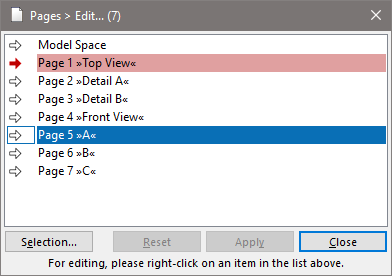
"Pages" Dialog
|
|
"Pages" Dialog |
www.CAD6.com |
|
How can I access information on this dialog?
The following commands are available by right-clicking into the page list:
Edit Calls the "Edit Page" dialog or "Edit Model Space" dialog, respectively, from which all selected pages can be initialized with identical settings.
Auto-Assign Page to New Objects If checked, all objects created from now on will automatically be assigned to the active page. Otherwise, they will be assigned to no page.
Activate Activates the right-clicked page without closing the dialog.
New Defines a new page. A dialog appears in which the name of the new page is entered.
Duplicate Duplicates the right-clicked page. A dialog appears in which the new name is entered.
Move Before Page Moves all selected pages in the list before the page with a given number.
Move Behind Page Moves all selected pages in the list behind the page with a given number.
Delete Deletes the selected pages. This action has to be confirmed. At least one page must exist at any time.
|
CAD6studio Release 2026.1 - Copyright 2026 Malz++Kassner® GmbH